
AI Connections
Connect an AI assistant to your AllSet account. Once linked, your AI tool can check your schedule, look up your services and manage bookings on your behalf.
AllSet answers your clients on WhatsApp and Instagram, books them in, takes payment and follows up, so your business keeps running while you work.
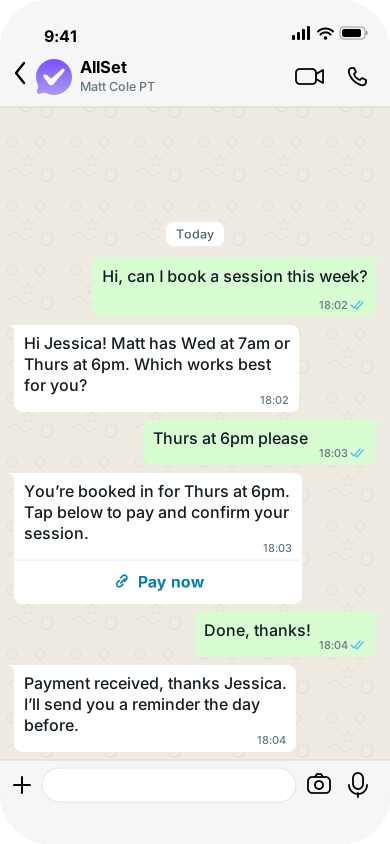
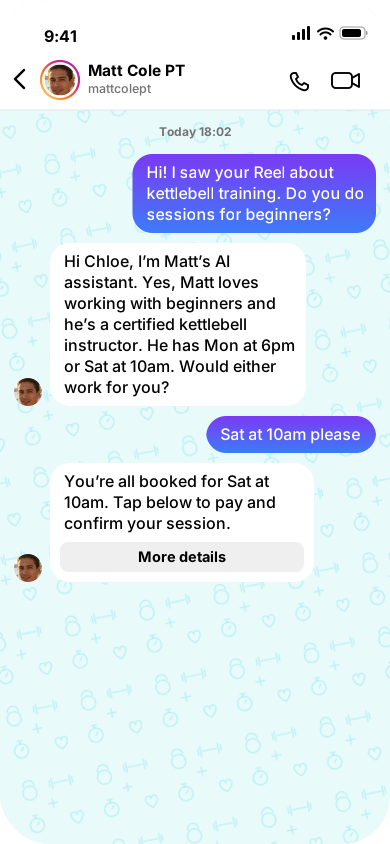

Answers inquiries on WhatsApp and Instagram and books clients straight into your calendar.

Clients pay with one tap in the conversation, and AllSet offers to remind anyone who hasn't paid.

Spots clients who haven't rebooked and messages them before they drift.
Connect an AI assistant to your AllSet account. Once linked, your AI tool can check your schedule, look up your services and manage bookings on your behalf.
Write knowledge base entries and save them as drafts before they go live. Draft topics are excluded from chatbot answers, so you can build out your knowledge base without half-finished entries reaching clients.
Set up a dedicated bot on any of your channels to answer prospect questions from your own knowledge base and surface your call to action. When a prospect clicks a booking button, the bot checks your real availability, shows the open times, and lets them confirm a slot — all within that first conversation. The bot discloses it is AI before its first reply. Configure it, test it in your dashboard, and connect it to a live channel when you are ready.
Browse every feature available across AllSet. Search by name, filter by area or status and sort to find exactly what you need.
Manage every booking from creation to completion — schedule, reschedule, cancel, and track all client appointments in one place.
Create a booking for any client — pick the service, date and time, and AllSet checks availability so nothing clashes.
Find any booking fast with date range filters, status tabs (active or cancelled), past/future quick filters, and free-text search.
Move a booking to a new date and time. AllSet checks the new slot is available and notifies the client automatically.
Cancel a booking and let AllSet apply your refund policy automatically — full refund, partial refund, or credit back to the client's package. From the dashboard you can cancel just one booking or every booking in a session at once, with explicit confirmation of scope before anything is processed.
Book multiple sessions for a client in one go — ideal for block-booking a week or filling a course.
Set up repeating appointments — weekly, fortnightly, or monthly — with an end date or a set number of sessions. AllSet checks availability for the entire series and creates as many bookings as it can if some dates are unavailable. Time slots correctly respect your custom slot intervals.
See all your bookings on a monthly calendar alongside events from connected Google or Outlook calendars.
Clients get automatic messages the moment a booking is created, rescheduled, or cancelled — no manual chasing needed.
Set rules per service: maximum bookings per client, minimum notice period, and date restrictions to control when bookings can be made.
Choose how each booking is paid: request card payment, use package credits, or mark as zero cost.
Clients message what they need and AllSet guides them through service selection, date, time and confirmation — all in chat.
Clients check their upcoming bookings, cancel, or reschedule — all through chat, without calling you or logging into anything.
Mark sessions that have already taken place as attended — from the dashboard or just by telling AllSet in chat. Clients receive a confirmation that reflects the completed session.
Set up and manage the services you offer — pricing, duration, availability, and optional extras — all from one place.
Add new services or update existing ones — set the name, description, duration, and price in your local currency.
Set prices per service, with different pricing available for each location if you operate from multiple sites.
Set how long each service takes. AllSet uses this to calculate available time slots and prevent overbooking.
Set specific working hours for each service, per day of the week — useful when certain services are only available at certain times.
Override your regular hours for specific dates — holiday hours, special events, or early finishes. When adding an override, you can choose to apply it to just one service or all your active services at once.
Offer optional upgrades on top of your services — like aromatherapy add-ons or deluxe upgrades — each with its own price.
Hide services from active listings without deleting them. Archived services can be restored at any time.
Define which staff, rooms, or equipment each service needs. Choose 'any available' or a specific person or resource.
All your clients in one place — phone, email and Instagram contacts alongside booking history, credit balance and more. Search, filter and manage records with full visibility of each client's relationship with your business.
Add clients with their name, phone number, and email. Phone numbers are validated for international format automatically.
Find any client instantly with free-text search across names and contact details.
Move inactive clients to archive to keep your active list clean. Restore archived clients when needed.
Send a personalised invite to any client, bringing them straight into your booking chat.
AllSet flags clients who haven't booked recently, so you can spot who's drifting and re-engage before they're gone.
Share your business QR code so new clients can start a chat and book straight away.
Verify client phone numbers in chat to keep your contact list accurate and secure.
See each client's subscription status directly on their client card. Tap to view plan details, price and billing interval, credits per cycle and key dates. Cancel a subscription from the same panel — no digging through settings.
Sell pre-paid bundles, courses, and subscriptions — giving clients a reason to commit and you a steadier income.
Bundle service credits at a set price. Clients buy the package and use credits each time they book.
Sell multi-session courses — like a 6-week programme — with a fixed number of sessions and your cancellation policy built in.
Offer monthly subscriptions with set service entitlements and credit allowances. Billing handled automatically through Stripe. You can set a fixed billing day (e.g. the 1st or 15th of each month) so every subscriber renews on the same date, with prorated credits for the period before their first renewal. Clients receive a message confirming their credit balance each time their subscription renews.
Hide discontinued packages from active listings. Restore them when needed.
Clients manage their own subscription directly in chat — cancelling, changing plan, or updating payment details — with AllSet sending secure links for anything that needs Stripe.
See every client's credit balance at a glance and adjust as needed — add, deduct, or extend expiry.
See remaining credits per client per package at a glance. Low-credit and zero-credit alerts flag clients who may need a top-up.
Manually add credits to a client's account — as a goodwill gesture, correction, or reward.
Deduct credits from a client's balance with a recorded reason, keeping a clear audit trail.
A full audit trail of every credit movement for each client — grants, usage, manual adjustments, and expiry events. Covers credits from all sources: package purchases, subscription grants, refunds, and rewards. The running balance reconciles exactly with the current credit total.
Give service credits an expiry period — credits expire a set number of days or weeks after the subscription renews. Expired credits are blocked at booking time so nothing slips through. Set expiry when creating or editing a subscription package.
Sessions and payments handled together. Accept cards, manage refunds, and keep every payment up to date.
Connect your Stripe account to start accepting payments. Supports card, Apple Pay, and Google Pay.
AllSet sends a payment link in the chat after booking. Clients tap, pay by card, Apple Pay or Google Pay, and the booking is confirmed.
Clients receive an automatic email receipt after every payment — no manual paperwork.
When a booking is cancelled, AllSet processes the refund automatically based on your refund policy.
Create and manage discount coupon codes with configurable validity periods and discount rules.
Clients can save their card for quicker payments. When a client pays via their saved card in chat, AllSet charges it directly. If the bank requires a security verification step, the client receives a checkout link to complete it and confirm their purchase.
If a booking goes unpaid, AllSet sends a reminder when the payment window passes, then follows up again the day after the session ends. Clients with a saved card get a one-tap payment button right in the chase message. Two automated chances to collect before you need to get involved.
Set your hours, manage staff and rooms, and let AllSet work out what's available — so your calendar fills without clashes.
Set your regular operating hours for each day of the week per location.
Block out holidays, personal time, or maintenance periods. AllSet removes those slots from availability automatically.
Manage your staff, rooms, and equipment. Each resource has its own availability schedule and can be linked to the services that need it.
Set weekly schedules for each staff member, room, or piece of equipment — AllSet only offers time slots when the right resources are free.
Block out specific staff or rooms for holidays, sick days, or maintenance. Bulk operations make it quick to manage across the team.
AllSet automatically calculates available slots by combining your business hours, staff schedules, existing bookings, time off, and buffer time.
Set a gap between bookings per service — for prep, cleanup, or travel time — so you're never back-to-back when you shouldn't be.
Each location runs in its own timezone. Clients and staff always see times in the right local format.
Run multiple locations — each with its own hours, pricing, staff, and services — all managed from one dashboard.
Automated client outreach that works towards an outcome. Build a follow-up with the AI wizard, choose when it fires and who it applies to, and AllSet holds a natural conversation that ends in a booking, a purchase, or a report back to you.
Describe what you want in plain language and the assistant designs the whole follow-up — the conversation, the goal and the automation — grounded in your real services, prices and packages, and validated before it can be saved.
Fire follow-ups from real business moments: a client joins, books, cancels or reschedules, buys a package, credits change, or a subscription starts, fails, renews or is cancelled.
Approve sends before they go out with check-with-me-first, dry-run any client to see whether an automation would fire and why, review a plain-language activity log, and switch everything off with one kill switch.
Every follow-up works towards a goal. The AI explores, makes exactly one natural ask, and the moment a client says yes it hands them straight into your booking or package flow — they never have to say it twice.
When a follow-up conversation ends, AllSet writes an outcome-aware report — what was discussed, whether the goal was met, and what happened next. You get a message with a link that opens the report in your dashboard in one tap.
A library of ready-made follow-ups — feedback requests, re-engagement, goal reviews, check-ins, referrals and more. Pick one, tweak the timing, and turn it on.
React to the booking lifecycle — after a booking is made, changed or cancelled, or timed against the appointment itself, like a check-in two days before the session.
Send immediately, wait minutes to months after the trigger, or anchor to the appointment time. Keep messages inside business hours with timezone-aware send windows, limit to once per client, and set cooldowns so nobody is over-messaged.
Send only when it makes sense — stack conditions on credit balance, days since last booking, time as a client, booking count, or an active package or subscription, combined with any/all logic.
Coaching messages from your assigned partner, powered by AllSet. Training and resourcing partners use it to guide their people — nudges, milestones and next steps that keep a new business moving.
Daily nudges tailored to where your business is right now — setup steps, growth actions, or things that need attention.
Your partner's coach celebrates the wins — first client, first booking, payments connected — keeping you motivated as your business grows.
Tracks your setup progress and sends targeted guidance from your partner for anything you haven't completed yet.
If your business goes quiet, your partner's coach reaches out to help you get back on track — before inactivity becomes a habit.
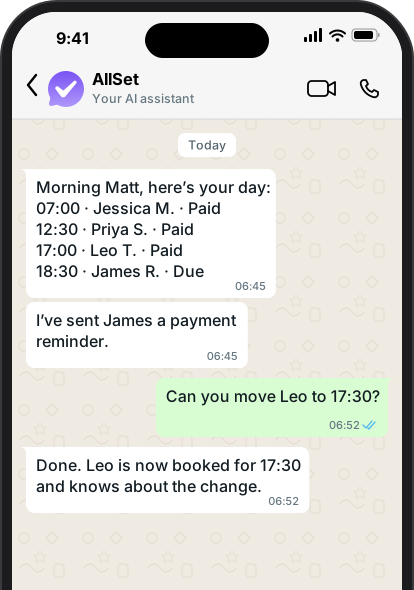
Run your business by chatting to AllSet — like a brilliant personal assistant in your pocket. Check what's happening, change your day, and get answers on whichever channel you use.
Start each day with a summary of what happened — new bookings, cancellations, payments received, and client activity. Tap action buttons in the digest to act immediately: tap 'Chase now' next to an unpaid booking and AllSet sends the payment reminder to the client on the spot.
Instant updates when something important happens — your first payment lands, a new client joins, or a pattern needs your attention.
Ask who's booked tomorrow, check availability, book a client in, reschedule or cancel — even record a past session — all in one message.
Say 'I'm off Friday' and it's done. Block out holidays or set recurring time off, and AllSet clears your availability automatically.
Add a new client, check who's got credits left, or look up payments, refunds and receipts — without opening the dashboard.
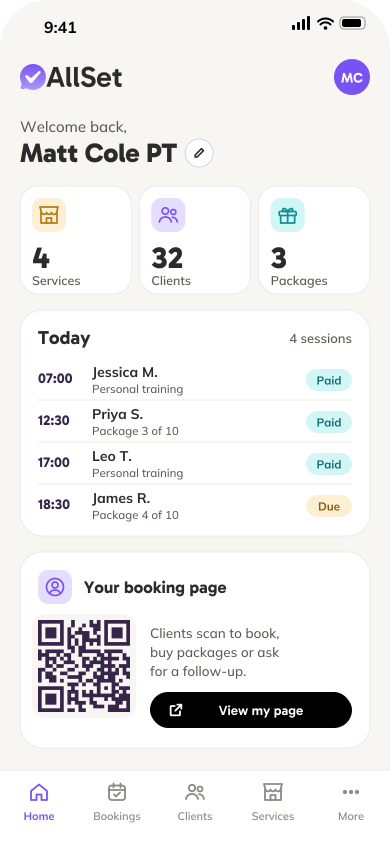
Your business at a glance — key numbers, setup progress, and quick access to everything you need.
See your total services, packages, and client counts the moment you log in, with quick links to every section.
A visual checklist of setup steps — see what's done and what's left so you can get up and running quickly.
Change your business display name anytime, right from the dashboard.
See everything AllSet does on your behalf — messages sent, bookings handled, and how your usage maps to your plan.
Browse all sent messages by month — see who received what, when, and through which channel.
Track your monthly usage at a glance. On a billed plan, see credit consumption and how it affects your balance. On a pre-paid plan, see message volumes and AllSet activity.
Tap into any activity to see the full message, recipient, and details.
Manage your AllSet plan, buy credits, and keep track of payments. New users start with a free trial, no card needed. Subscribe when ready and manage everything through Stripe.
Browse AllSet plans — compare what's included and subscribe through Stripe.
See your current credit balance — including monthly allowance and any top-ups you've purchased.
Buy extra credits whenever you need them. Top-up credits never expire, so they're always there when you need more.
View every subscription payment and credit purchase with links to receipts.
Update your card, change your plan, or cancel — all through the Stripe customer portal.
An in-dashboard help system that answers questions about how AllSet works. The guidance is tailored to your account type, so the articles you see are relevant to the features and channels your account uses.
The AI knows which page you're on and gives relevant help straight away — no need to explain what you're looking at.
A comprehensive knowledge base covering setup, feature guides, troubleshooting, and frequently asked questions — all searchable through the AI assistant.
Help links and icons throughout the dashboard that open the AI chat with the right question already filled in.
Manage your profile, security, and connected accounts.
View and update your name, email, sign-up date, and business QR code.
Change your account email securely — both old and new addresses must confirm before the switch takes effect.
Change your password through a secure reset flow.
See which login providers (like Google) are linked to your account.
Request account deletion through our support team. We protect against accidental data loss.
Connect Stripe, Google and Outlook calendars, and other integrations — all managed from one page.
Two-way sync with Google Calendar. Your Google events show in AllSet, clients can't book on top of them, and AllSet bookings appear in Google.
Two-way sync with Microsoft Outlook and Office 365 calendars. Clients can't book on top of calendar events.
See events from all your connected calendars directly in your AllSet bookings view — one calendar for everything.
AllSet monitors calendar sync health and can replay missed updates if your calendar provider had an outage.
Connect your Stripe account through a guided setup flow. AllSet collects your business details first, including your business type, services, contact information and address, then carries them across to Stripe so the form arrives mostly pre-filled. If you already have a Stripe account, you can skip straight to connecting it. Check your connection status or disconnect at any time from the Connections tab.
A dedicated dashboard for distribution partners to manage their tenant portfolio, track revenue, and oversee account access — secured with two-factor authentication.
At-a-glance summary of your tenant portfolio — total tenant count, CRM reference coverage, and quick status indicators.
View all your tenants in one list — business name, owner, email, CRM reference, and tenant ID. Data is anonymised for privacy compliance.
Track your earnings month by month. See total revenue across all tenants, your commission per payment, and expand any tenant to view their full payment history.
For partners who pre-pay AllSet licenses for their team — view your tenants and their subscription status in one place.
See who has access to your partner dashboard. New owners are added by the AllSet team on request.
Every partner login is secured with mandatory two-factor authentication — magic link email plus a TOTP authenticator app code.
Partners can connect Mailchimp Customer Journeys to AllSet so marketing sequences can trigger template messages directly to clients.
Your data is private and protected — with full isolation between businesses, secure login, and a complete audit trail.
Every business's data is fully isolated. No business can see another's clients, bookings, or settings — guaranteed at the database level.
Secure login with Google sign-in, email and password, or a one-tap magic link sent straight to your inbox.
Every change to your data is logged — who changed what, when, and what it was before.
All payment notifications are verified cryptographically, ensuring no fraudulent transactions are processed.
Let clients sign up when your services are fully booked, so you can reach out when a slot opens.
Let clients book appointments by phone through an AI voice assistant.
Reward clients and grow your business with referral codes and redeemable rewards.
Customise your business look with your own branding, colours, and logo — shown to clients across AllSet.
Connect AllSet with your CRM, webhooks, and third-party tools through a flexible integration framework.
Every service, package and add-on supports translated labels — so your clients see content in their language.
Set pricing in your local currency, with different currencies available per location.
A single, mobile-first page for your business that clients reach by link or QR code — scan, tap, and they're booking in seconds.
Make the page yours — theme it to match your brand.
Add buttons that link straight to what matters: book a session, try a taster, buy a package, or start an icebreaker follow-up conversation.
One scan takes a new client from stranger to booked — no app, no sign-up, no friction.
Choose one or many channels to engage your clients — use AllSet's ready-made numbers or connect your own accounts, and AllSet runs the same conversations, bookings and payments across every one of them.
Book, reschedule, and pay through Google Messages on Android. AllSet brings the full booking experience to RCS, with tappable buttons for service selection, dates, and confirmations, all within your clients messages app.
Connect your Instagram business profile with a quick OAuth sign-in. AllSet sits inside your DMs, answering questions and taking bookings for anyone who messages your page — replying within Instagram's 24-hour messaging window.
Connect or disconnect your WhatsApp Business number, Instagram account or Facebook Page directly from the connections tab in your dashboard — no help from the AllSet team needed.
Connect your Facebook Page and AllSet handles Messenger end to end — the same conversations, bookings and payments as WhatsApp, straight from your page's DMs.
Ready to go from day one — AllSet provides the numbers your clients message. In the UK that's WhatsApp, SMS and RCS; in the US it's SMS, RCS and iMessage. No connecting, no configuration — usage simply comes out of your plan's credits.
Connect the WhatsApp Business number you already own. AllSet works inside it without taking it over — you keep using your WhatsApp Business app as normal, while AllSet answers client messages, takes bookings and handles payments. Replies go out on your number, all booking and payment templates are copied to your account automatically when you connect, and each WhatsApp number keeps its own separate conversation history.
Connect your own Twilio account to add additional SMS, RCS and iMessage numbers to your AllSet setup — your numbers, your billing, the same AllSet experience.
Move a client from one subscription package to another directly from your dashboard. The change takes effect at the next billing cycle, leaving the current period's credits untouched. If the new plan bills on a different day than the client's current billing date, the change is refused and your dashboard explains exactly which days conflict. Both the client and business owner receive a notification when a plan change goes through.
Business owners can ask AllSet about a specific client's credit balance or grant history directly from WhatsApp, without opening the dashboard. Ask by name to see the current balance, or by name and date to see how many credits were granted on a particular day.
Send a message to everyone in a group class or course at once. Pick the group, choose the message type — booking details, an announcement, or an offer — and AllSet delivers it to every current member. Cancelled bookings are excluded automatically.
A prospect-facing conversation mode for businesses that attract new clients through chat. Answers questions from your knowledge base without booking-platform phrasing. Surfaces your call to action naturally on the first substantive reply, then stays focused on the enquiry.
First-time prospects on Instagram and Facebook Messenger receive a tappable button in the conversation that takes them to a secure checkout page. They fill in their details there, and AllSet confirms the booking. Works for both paid and free sessions.
Change the phone number on your AllSet account directly from account settings. AllSet sends a verification message to the new number and only switches it over once you confirm it is yours.
Update a client's phone number from their record in the dashboard. AllSet asks the client to verify the new number before switching it over, so the original number stays active until they confirm.
For accounts where the owner does not use WhatsApp, AllSet delivers booking confirmations and chatbot conversation summaries by email instead of chat. The notification medium is set per account and defaults from the partner configuration.
Clients who book through Instagram or Messenger verify their email during checkout before completing their purchase. Their verified email is recognised for future bookings, so returning clients go straight into the new booking flow without interruption. Booking confirmations and reminders are delivered by email automatically.
Set a minimum notice period for cancellations. If a client tries to cancel inside that window, the chatbot explains what they will forfeit and asks for explicit confirmation before anything is processed. Unpaid bookings are exempt.
Send a payment request to any client directly from their record in your dashboard. Enter the amount and currency, and AllSet sends them a secure payment link. Both you and the client receive a confirmation once they pay. No booking required.
Set up a dedicated bot on any of your channels to answer prospect questions from your own knowledge base and surface your call to action. When a prospect clicks a booking button, the bot checks your real availability, shows the open times, and lets them confirm a slot — all within that first conversation. The bot discloses it is AI before its first reply. Configure it, test it in your dashboard, and connect it to a live channel when you are ready.
A monthly summary of your business finances in the dashboard: subscription payments received, refunds, payment costs, and renewal risks at a glance. See where your money is coming from and flag any clients at risk of lapsing.
Write knowledge base entries and save them as drafts before they go live. Draft topics are excluded from chatbot answers, so you can build out your knowledge base without half-finished entries reaching clients.
Manage your email and WhatsApp marketing opt-ins and opt-outs from your account settings. If your WhatsApp number was blocked after receiving a STOP reply, you can see the reason and re-enable marketing from the dashboard.
Connect an AI assistant to your AllSet account. Once linked, your AI tool can check your schedule, look up your services and manage bookings on your behalf.
Start free in your Instagram DMs, or try AllSet Pro on WhatsApp and Instagram free for your first month, with no card needed.